
(And Why It’s a Game-Changer for Small Businesses)
If you’ve ever struggled to match the colors on your flyer to the fonts on your website—or wondered why your social media posts don’t quite “feel” like your brand—this post is for you. Branding is more than just a logo; it’s the personality and consistency that make your business recognizable and trustworthy. But here’s the good news: you don’t need a massive marketing budget or a fancy agency to create a cohesive brand. You just need Canva and a little know-how.
Let’s dive into how you can build your own DIY brand kit using Canva—and why it’s one of the smartest investments you can make for your business.
Why Every Small Business Needs a Brand Kit
Think of your brand kit as your business’s wardrobe. Without it, your marketing materials might look like they were thrown together last minute. With it, they’ll look polished, professional, and consistent—whether you’re creating a social media post, a business card, or a banner for your next event.
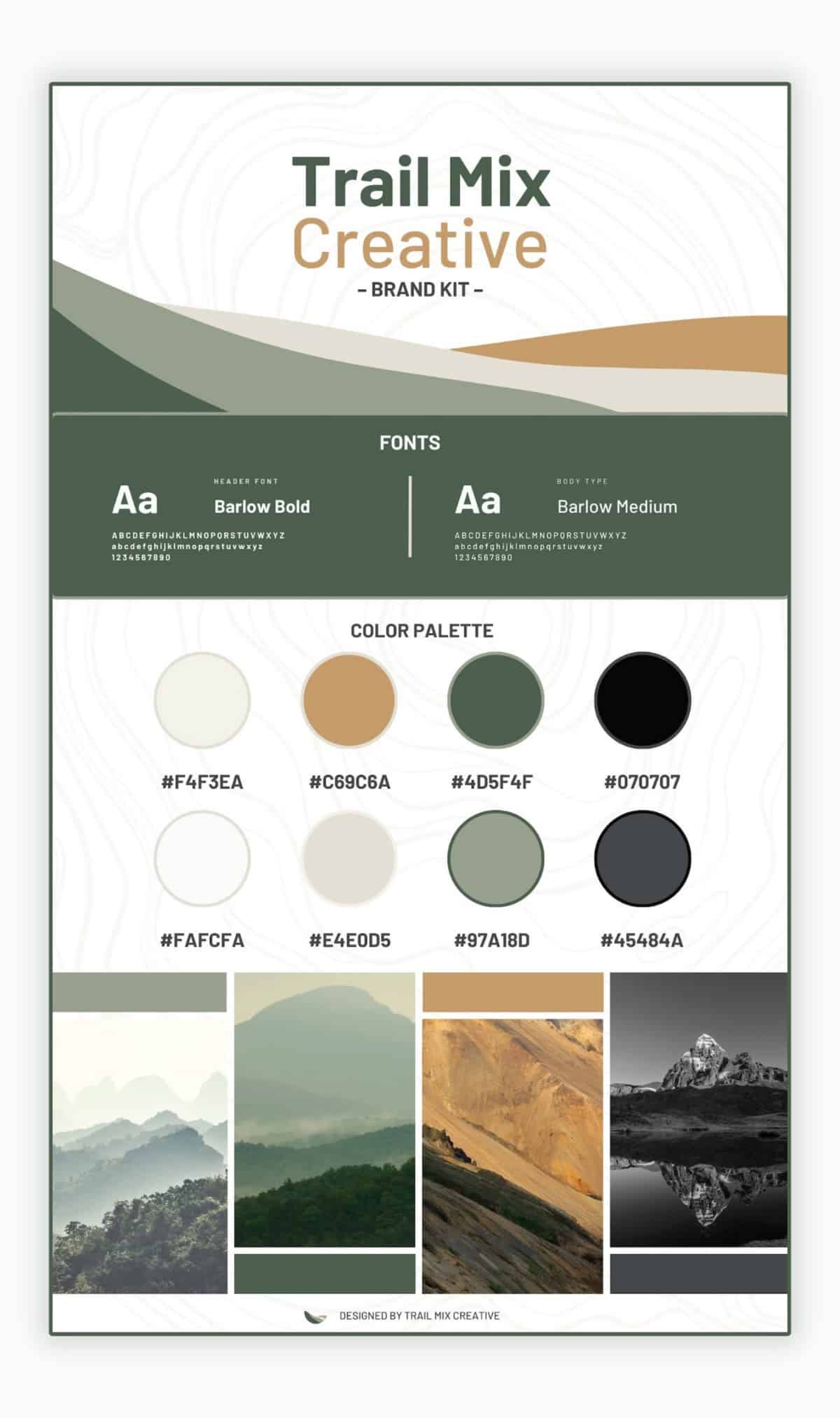
A brand kit includes:
- Your logo (the face of your brand).
- Your color palette (the mood-setters).
- Your fonts (the voice).
- Design elements (icons, patterns, and textures that add flair).
Why does this matter? Consistency builds recognition. Recognition builds trust. And trust turns casual viewers into loyal customers. With Canva’s Brand Kit feature, creating a cohesive brand has never been easier—or more fun.
How to Build Your DIY Brand Kit in Canva
Ready to start? Here’s how to build your brand kit step by step in Canva.
Step 1: Upload Your Logo (or Create One)
If you already have a logo, upload it into Canva to use across all your designs. Don’t have a logo yet? No problem. Canva offers an array of customizable logo templates to get you started. Browse their templates or check out their logo design tips for inspiration.
Pro Tip: Choose a logo style that reflects your business’s personality. Are you bold and modern? Quirky and fun? Classic and professional? Your logo should set the tone for the rest of your branding.
Step 2: Define Your Brand Colors
Colors evoke emotions and communicate your brand’s essence. Canva’s color palette generator makes it easy to experiment until you find the perfect combination. Once you’ve selected your colors, add them to your Brand Kit in Canva Pro for instant access across all designs.
Pro Tip: Use tools like Canva’s Color Wheel to find complementary colors that pop.
Step 3: Select Your Fonts
Fonts are the unsung heroes of branding. Choose a combination of a headline font, a body text font, and an optional accent font. Canva has hundreds of free fonts to explore, and their font pairing tool can help you find the perfect match.
Pro Tip: Avoid using more than three fonts to keep your designs clean and professional.
Step 4: Add Design Elements
This is where your brand’s personality really shines. Add icons, patterns, and textures that reflect your style. Whether you’re going for minimal, playful, or edgy, these small details make a big impact.
Pro Tip: Browse Canva’s extensive library of icons and illustrations to find elements that align with your business.
Why Canva Makes Branding Accessible
What makes Canva so powerful is its simplicity. You don’t need to be a designer to create professional-quality branding. Canva’s drag-and-drop interface, combined with its Brand Kit feature, ensures that your branding stays consistent across all your projects.
And if you’re wondering how this works in practice, check out Canva’s customer case studies to see how other small businesses have used the platform to transform their branding.
Tips for Maintaining Brand Consistency
Once you’ve built your brand kit, it’s time to put it to work. Here are some quick tips to keep your branding consistent:
1. Use Your Brand Kit for Every Design: Canva’s Brand Kit feature makes it easy to apply your logo, colors, and fonts to any project with just a few clicks.
2. Stay True to Your Style: Resist the temptation to add trendy fonts or colors that don’t align with your brand. Consistency is key.
3. Train Your Team: If multiple people handle your marketing, ensure they understand and use your brand kit. Canva’s collaboration tools make this simple.
How Trail Mix Creative Can Help
Feeling overwhelmed? That’s where we come in. At Trail Mix Creative, we specialize in helping small businesses create custom Canva brand kits that reflect their unique identity. Whether you need a professionally designed logo and brand identity, a curated color palette, or guidance on Canva’s features, we’re here to help.
We also offer personalized training to ensure you feel confident using Canva. From the basics to advanced tips, we’ll set you up for success. If you’re ready to take your branding to the next level, let’s chat.
Start Building Your Brand Kit Today
Your brand deserves to be seen, remembered, and trusted. With Canva, you have everything you need to make that happen—right at your fingertips. Whether you’re just starting out or looking to refresh your current branding, creating a DIY brand kit is a powerful step toward building a stronger, more cohesive brand.
So, fire up Canva, unleash your creativity, and start building your brand kit today. And if you need a little guidance, you know where to find us. Let’s make your brand unforgettable—together.